

Every company depends on data. Customer records, sales reports, invoices, employee files, product information, website content, application data, financial documents, marketing reports, emails, videos, backups, and business dashboards are all examples of data that companies need to store and manage properly.
In the past, many businesses stored data on local computers, office servers, hard drives, and physical storage devices. This worked for a time, but it also created many problems. Storage space was limited. Hardware was expensive. Backups were difficult. Data could be lost if a server failed. Remote access was not always easy. Security depended heavily on local IT teams.
Today, more companies are using cloud platforms such as Amazon Web Services (AWS) and Microsoft Azure to store and manage data.
AWS and Azure help businesses store data in secure, scalable, and flexible cloud environments. Instead of buying and maintaining all storage hardware in-house, companies can use cloud services to store files, databases, backups, application data, and large business datasets.
Cloud storage is not only about saving files online. It is about making data easier to access, protect, organize, analyze, and recover. It also helps companies support remote work, business growth, digital applications, reporting, automation, and artificial intelligence.
For modern businesses, data is one of the most valuable assets. AWS and Azure provide the infrastructure and tools that help companies manage that asset more effectively.
What Is Cloud Storage?
Cloud storage means storing data on remote servers managed by a cloud provider instead of storing everything only on a local device or office server.
When a company uses cloud storage, its data is stored in data centers operated by providers such as AWS or Microsoft Azure. Authorized users can access that data through the internet, applications, or secure business systems.
A simple example is when a business stores documents in a cloud drive instead of saving them only on one office computer. A more advanced example is when a company stores millions of customer records, application files, website images, database backups, and analytics data in cloud storage services.
Cloud storage helps companies because it can grow as the business grows. If the company needs more storage, it can increase capacity without buying new physical hardware immediately.
Cloud storage can support:
- Business files
- Application data
- Customer records
- Website images and videos
- Database backups
- Financial documents
- Log files
- Data analytics files
- Machine learning datasets
- Archival records
- Disaster recovery copies
In simple words, cloud storage gives companies a flexible way to keep their data safe, organized, and available.
Why Companies Need Better Data Storage
As businesses become more digital, the amount of data they create continues to grow. Even small companies now collect data from websites, social media, customer service systems, online payments, accounting software, inventory tools, HR platforms, and email communication.
This creates several challenges.
Companies need to store more information than before. They need to protect sensitive data. They need employees to access files from different locations. They need backups in case something goes wrong. They need data for reports, dashboards, and business decisions.
Traditional storage systems can become difficult to manage when data grows quickly.
Common problems with old storage methods include:
- Limited storage space
- High hardware costs
- Risk of server failure
- Difficult backup management
- Slow access for remote teams
- Poor disaster recovery
- Security weaknesses
- Manual file organization
- Lack of scalability
- Difficulty managing large datasets
Cloud platforms help solve many of these problems by giving companies flexible storage, security tools, backup options, access control, monitoring, and integration with other business services.
What Is AWS?
AWS stands for Amazon Web Services. It is Amazon’s cloud computing platform. AWS provides many cloud services, including storage, computing, networking, databases, security, analytics, artificial intelligence, and application hosting.
For data storage, one of the most well-known AWS services is Amazon S3. S3 stands for Simple Storage Service. It is used to store objects such as files, images, videos, backups, application data, and data lakes.
AWS also offers other storage and database services depending on business needs. For example, companies may use AWS for file storage, block storage, database storage, backup storage, and archived data.
Businesses use AWS because it can support small websites, large enterprise systems, mobile applications, data analytics platforms, and global business operations.
What Is Microsoft Azure?
Microsoft Azure is Microsoft’s cloud computing platform. It provides cloud services for storage, computing, networking, databases, artificial intelligence, security, analytics, application development, and business solutions.
Azure is widely used by companies that already use Microsoft technologies such as Windows Server, Microsoft 365, Active Directory, SQL Server, Power BI, and enterprise business applications.
For storage, Azure offers services such as Azure Blob Storage, Azure Files, Azure Disk Storage, and Azure Backup. These services help companies store different types of data, from simple files to large-scale application data and backups.
Azure is especially useful for businesses that want cloud storage connected with Microsoft tools, identity management, security, reporting, and enterprise applications.
How AWS and Azure Store Business Data
AWS and Azure help companies store different types of data using different storage models. Not all data is the same, so cloud platforms provide several storage options.
1. Object Storage
Object storage is used to store unstructured data such as images, videos, documents, backups, log files, and large datasets. In object storage, each file is stored as an object with metadata.
Amazon S3 and Azure Blob Storage are common examples of object storage.
Object storage is useful for:
- Website images
- Application files
- Backup data
- Data lakes
- Video storage
- Log files
- Documents
- AI and analytics datasets
Object storage is popular because it can handle very large amounts of data and is designed for scalability.
2. File Storage
File storage works like a shared folder. It allows multiple users or systems to access files in a familiar folder structure.
Businesses use file storage for shared documents, team files, application files, and business content that needs to be accessed by many people or systems.
Azure Files and AWS file storage services can support this type of need.
3. Block Storage
Block storage is often used for virtual machines, databases, and applications that need high performance. It works like storage attached to a server.
For example, if a company runs a virtual server in the cloud, that server may need block storage for its operating system, applications, and data.
4. Database Storage
Many companies store structured data in databases. This includes customer records, transactions, product details, employee data, orders, and financial information.
AWS and Azure both provide database services that help companies store and manage structured data. These services can support relational databases, NoSQL databases, data warehouses, and analytics systems.
5. Backup and Archive Storage
Some data does not need to be accessed every day but must still be kept for legal, compliance, historical, or disaster recovery reasons.
Cloud platforms allow companies to store backup and archived data at different storage levels depending on how often it needs to be accessed.
This helps businesses manage cost while keeping important data available when needed.
How Cloud Storage Helps Companies Scale
One of the biggest benefits of AWS and Azure is scalability.
Scalability means the ability to grow or reduce resources based on business needs.
Imagine a company stores customer invoices on a local server. As the company grows, the number of invoices increases. Eventually, the server may run out of space. The company then needs to buy new hardware, install it, configure it, and maintain it.
With cloud storage, the company can increase storage capacity more easily. It does not need to physically install a new server every time data grows.
Scalability is useful for:
- Growing businesses
- Seasonal demand
- E-commerce websites
- Mobile applications
- Data analytics projects
- Backup systems
- Video platforms
- Customer portals
- AI projects
For example, an online store may need more storage during holiday sales because product images, orders, customer activity, and logs increase. Cloud storage can support this growth more flexibly than traditional storage.
How AWS and Azure Help With Data Backup
Data backup is one of the most important parts of data management.
A backup is a copy of data that can be used if the original data is lost, damaged, deleted, or corrupted.
Companies need backups because data loss can happen due to:
- Hardware failure
- Human error
- Cyberattacks
- Accidental deletion
- Software issues
- Natural disasters
- System corruption
- Ransomware
AWS and Azure provide backup and recovery tools that help businesses protect their data. Companies can create automatic backups, store backup copies in different locations, and restore data when needed.
Cloud backup is useful because it reduces the risk of depending only on one local server or physical device.
For example, if a company’s office server fails, cloud backup can help recover important files and systems.
How Cloud Platforms Support Disaster Recovery
Disaster recovery means preparing for serious problems that can interrupt business operations. These problems may include server failure, cyberattacks, power outages, fire, flood, or major system errors.
In traditional IT environments, disaster recovery can be expensive and complicated. Companies may need a second physical location, duplicate servers, backup networks, and manual recovery plans.
Cloud platforms make disaster recovery more practical for many businesses. Data and systems can be copied to cloud environments or different regions. If one system fails, the company may be able to recover faster.
AWS and Azure help companies plan for disaster recovery by offering storage replication, backup tools, monitoring, and recovery services.
A strong disaster recovery plan helps businesses reduce downtime and protect important operations.
How AWS and Azure Improve Data Access
Modern employees often work from different locations. Some work in offices, some work remotely, and some travel. Teams may also be spread across different cities or countries.
Cloud storage helps authorized users access business data from different locations, as long as they have proper permissions and secure access.
This is important for:
- Remote work
- Hybrid teams
- Customer service teams
- Sales representatives
- Field workers
- Project teams
- Global operations
- External partners
For example, a sales team can access updated product documents from the cloud instead of waiting for someone in the office to email files. A finance team can access reports securely from different locations. A project team can share files without depending on local drives.
Cloud access improves collaboration, but it must be managed carefully through permissions, identity controls, and security rules.
How AWS and Azure Help Protect Data
Data security is one of the biggest concerns for companies. Businesses must protect customer information, employee records, financial data, intellectual property, business documents, and system access.
AWS and Azure provide many security features to help protect data.
Common security features include:
- Identity and access management
- Multi-factor authentication
- Encryption
- Network security controls
- Monitoring and alerts
- Role-based access
- Security logging
- Backup protection
- Compliance tools
- Threat detection
Identity and access management is especially important. It helps companies control who can access data and what they can do with it.
For example, an HR employee may need access to employee files, but not financial system settings. A finance manager may need access to accounting reports, but not application code. A system administrator may need infrastructure access, but should follow strict security controls.
Cloud security works best when companies design proper policies and train employees to follow them.
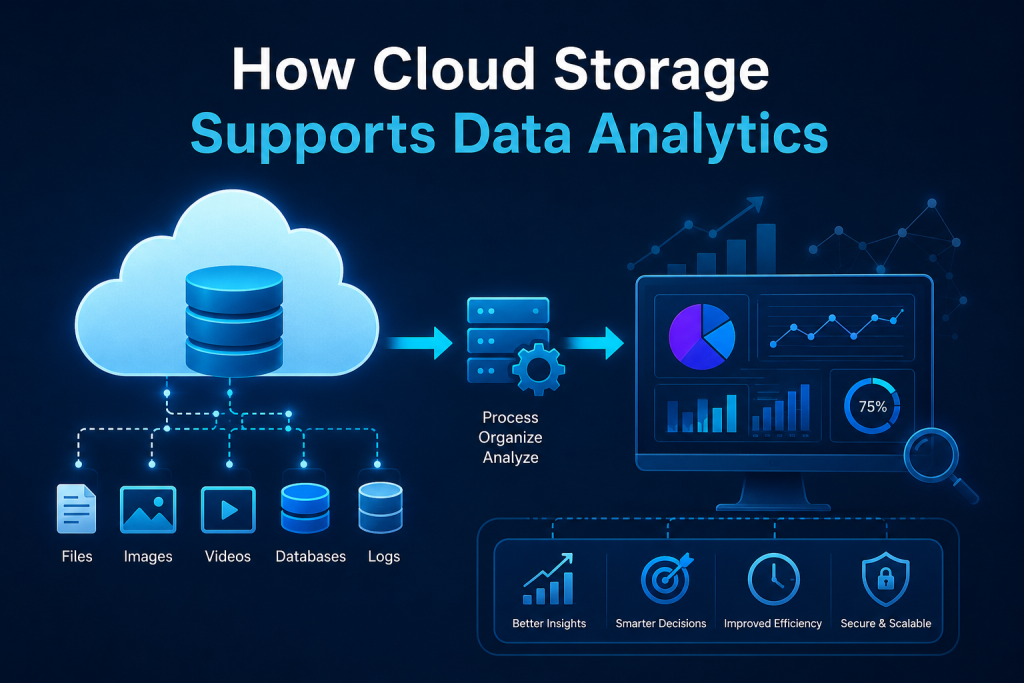
How Cloud Storage Supports Data Analytics
Data analytics depends on access to reliable data. Companies use analytics to understand sales, customers, operations, finance, marketing, supply chain, and employee performance.
AWS and Azure help companies store large amounts of data that can later be used for reporting and analytics.
For example, a company may store website activity logs, sales transactions, customer support records, and marketing campaign data in cloud storage. This data can then be connected to analytics tools to create dashboards and reports.
Cloud platforms support data analytics by helping companies:
- Store large datasets
- Organize raw data
- Build data lakes
- Connect data to reporting tools
- Process data at scale
- Support machine learning projects
- Share data securely
- Keep historical records
This is one reason cloud storage is important for modern business intelligence.
How AWS and Azure Support Artificial Intelligence
Artificial intelligence needs data. AI systems learn from information, identify patterns, and generate outputs based on data.
Companies that want to use AI often need strong data storage and data management first. If data is scattered across many systems, poorly organized, or not secure, AI projects become difficult.
AWS and Azure help companies store and organize data for AI projects. Cloud platforms can support large datasets, machine learning services, data pipelines, and computing resources needed for AI workloads.
For example, a company may use customer data to predict buying behavior. Another company may use support ticket data to improve customer service. A finance team may use historical data to forecast cash flow.
Before AI can provide useful results, the data must be available, clean, secure, and properly managed.
How Cloud Storage Helps Reduce Hardware Management
Traditional data storage requires physical hardware. Companies may need servers, storage devices, cooling, power, maintenance, replacement parts, backup equipment, and IT staff to manage the environment.
Cloud storage reduces the need for companies to manage all physical infrastructure themselves.
This does not mean IT teams are no longer needed. Their work changes. Instead of only maintaining hardware, they focus more on cloud administration, security, monitoring, cost optimization, automation, access control, and system design.
This shift is one reason cloud skills are valuable in today’s IT job market.
Cost Management in Cloud Storage
Cloud storage can be flexible, but companies must manage costs carefully. The cloud is not automatically cheap. Costs depend on how much data is stored, how often it is accessed, how it is transferred, and which storage services are used.
AWS and Azure provide cost management tools to help companies monitor spending. Businesses can choose different storage tiers depending on how frequently data is needed.
For example:
- Frequently accessed data may use a standard storage tier.
- Rarely accessed data may use a lower-cost archive tier.
- Temporary data may be deleted after a set period.
- Old backups may be moved to cheaper storage.
Good cloud cost management requires planning. Companies must understand what data they have, how often it is used, and how long it should be kept.
Cloud Data Management and Compliance
Many businesses must follow compliance rules related to data privacy, financial records, healthcare records, customer information, or industry regulations.
Cloud platforms provide tools that can help with compliance, but the company is still responsible for using them correctly.
Good data management includes:
- Knowing what data is stored
- Classifying sensitive data
- Setting access permissions
- Keeping audit logs
- Encrypting important data
- Managing retention periods
- Deleting data when appropriate
- Monitoring unusual activity
- Following legal and company policies
Cloud storage makes compliance easier in some ways because it provides structured tools, logs, and controls. But it also requires careful planning and governance.
Common Business Use Cases for AWS and Azure Data Storage
AWS and Azure support many real-world business use cases.
Website and Application Hosting
Companies store website images, files, videos, and application content in cloud storage. This helps websites and apps serve content more reliably.
Business Backups
Companies back up files, databases, virtual machines, and business systems to the cloud for protection.
Remote Work File Access
Cloud storage allows employees to access approved files securely from different locations.
Data Lakes
A data lake stores large amounts of raw data from different sources. Businesses use data lakes for analytics, reporting, and AI projects.
Database Storage
Companies store structured data for applications, customer systems, financial platforms, and business operations.
Archiving
Old records, compliance documents, and historical files can be stored in lower-cost archive storage.
Media Storage
Companies that work with images, audio, video, or design files can use cloud storage for large media libraries.
Disaster Recovery
Cloud platforms help companies recover data and systems after major disruptions.
AWS and Azure in Simple Business Terms
It is easy to think cloud technology is only technical, but its business value is simple.
AWS and Azure help companies answer important questions:
- Where should we store our data?
- How can we access data securely?
- How can we protect data from loss?
- How can we support remote teams?
- How can we store more data as we grow?
- How can we reduce hardware dependency?
- How can we prepare data for analytics and AI?
- How can we recover if something goes wrong?
- How can we control storage costs?
These questions matter to business owners, managers, IT teams, finance teams, operations teams, and data teams.
Skills Needed to Manage AWS and Azure Data
As companies use cloud platforms, they need professionals who understand how to manage cloud resources properly.
Important cloud data management skills include:
- Cloud computing fundamentals
- AWS and Azure basics
- Storage services
- Virtual machines
- Networking concepts
- Identity and access management
- Security best practices
- Backup and recovery
- Monitoring
- Cost management
- Data lifecycle management
- Basic scripting or automation
- Troubleshooting
A cloud administrator does not only create storage accounts or servers. They help keep cloud systems secure, organized, available, and cost-effective.
Toronto Innovation College’s AWS and Azure Administration Course outlines topics such as cloud computing fundamentals, AWS and Azure services, resource deployment, networking, security management, monitoring, troubleshooting, and cost management.
Mistakes Companies Should Avoid With Cloud Storage
Cloud storage is powerful, but companies can make mistakes if they do not manage it properly.
1. Giving Too Much Access
Not every employee needs access to every file or system. Permissions should be based on job roles.
2. Ignoring Backups
Storing data in the cloud does not automatically mean backup planning is complete. Companies still need proper backup and recovery policies.
3. Poor Naming and Organization
If files, buckets, containers, and databases are not named properly, cloud environments become difficult to manage.
4. Not Monitoring Costs
Cloud bills can increase if storage grows without control or if unused resources are left running.
5. Weak Security Settings
Misconfigured storage can expose sensitive data. Security settings must be reviewed regularly.
6. No Data Lifecycle Policy
Old data should be managed properly. Some data should be archived, some should be deleted, and some should remain active.
7. Lack of Employee Training
Employees need to understand secure file access, password protection, data privacy, and company rules.
Future of Cloud Data Storage
Cloud data storage will continue to grow because businesses are creating more data every year. Data from websites, mobile apps, sensors, transactions, videos, AI tools, and customer platforms will keep increasing.
The future of cloud storage will likely include:
- More automation
- Stronger security tools
- Better data classification
- AI-powered data management
- More advanced backup and recovery
- Hybrid cloud environments
- Lower-cost archive options
- Faster analytics integration
- Better monitoring and governance
Companies that understand cloud storage will be better prepared for digital transformation.
Conclusion
AWS and Azure help companies store and manage data by providing cloud storage, backup tools, security controls, databases, analytics support, disaster recovery options, and scalable infrastructure.
Instead of depending only on local servers and physical storage devices, businesses can use cloud platforms to store data securely and access it when needed. Cloud storage supports remote work, business growth, data analytics, AI projects, backup planning, and better collaboration.
AWS services such as Amazon S3 and Azure services such as Azure Blob Storage are important examples of how cloud platforms store large amounts of business data. But storage is only one part of the bigger picture. Good cloud data management also includes security, access control, cost management, monitoring, compliance, and disaster recovery.
For companies, AWS and Azure provide flexibility and control. For professionals, cloud skills create opportunities in IT administration, cloud support, systems engineering, data management, DevOps, and cloud security.
As data continues to grow, companies will need people who understand how to manage cloud platforms responsibly. AWS and Azure are not just technology tools; they are important foundations for modern business operations.
FAQs
1. How do AWS and Azure help companies store data?
AWS and Azure provide cloud storage services that allow companies to store files, backups, databases, application data, and large datasets in secure and scalable cloud environments.
2. What is cloud storage?
Cloud storage means storing data on remote servers managed by a cloud provider instead of storing everything only on local computers or office servers.
3. What is Amazon S3 used for?
Amazon S3 is used for object storage. Companies use it to store files, images, videos, backups, logs, application data, and data lakes.
4. What is Azure Blob Storage used for?
Azure Blob Storage is used to store unstructured data such as documents, images, videos, backups, logs, and large datasets.
5. Why do companies use cloud storage instead of local servers?
Companies use cloud storage because it is scalable, flexible, accessible, and useful for backups, remote work, analytics, disaster recovery, and large data management.
6. Is cloud storage secure?
Cloud storage can be secure when it is configured properly. Companies must use encryption, access controls, monitoring, multi-factor authentication, and strong security policies.
7. Can AWS and Azure help with data backup?
Yes. AWS and Azure offer backup and recovery tools that help companies protect data from loss, deletion, corruption, hardware failure, and cyberattacks.
8. How does cloud storage support data analytics?
Cloud storage allows companies to collect and organize large datasets that can be connected to analytics tools, dashboards, reporting systems, and AI platforms.
9. What skills are needed to manage AWS and Azure?
Important skills include cloud fundamentals, storage services, networking, security, identity management, backups, monitoring, troubleshooting, and cost management.
10. Are AWS and Azure useful for small businesses?
Yes. Small businesses can use AWS and Azure for file storage, backups, website hosting, remote access, security, and scalable business systems.